Your Account
My Profile and Password
Your name, photo, password, your access and your recent activity.
Last updated 23 Oct 2026
Open My Profile in the menu (or press your name at the top right).
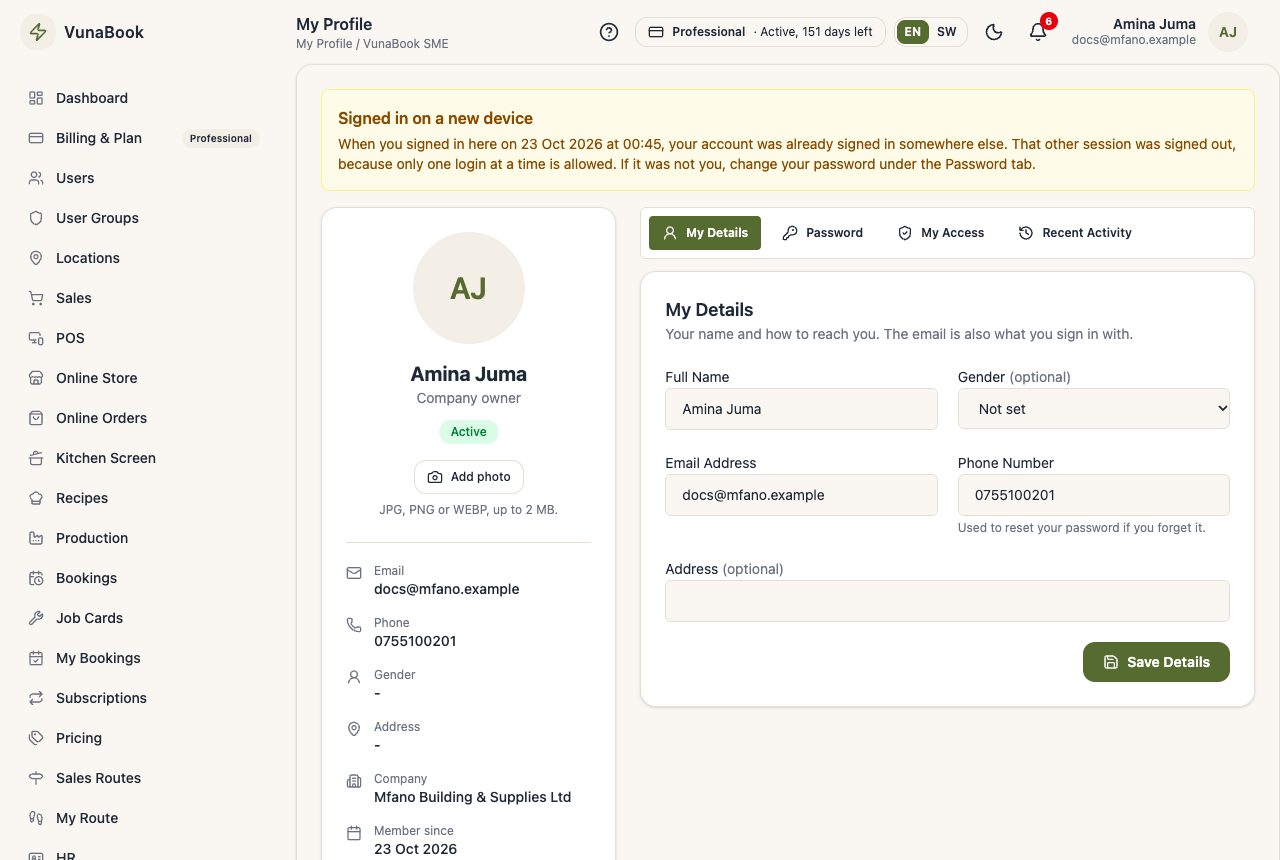
Tabs
- My Details: your name, phone and photo.
- Password: change your password. Use at least 8 characters.
- My Access: the groups, permissions and locations you have.
- Recent Activity: what you did lately.
Confirm your email
VunaBook only sends email to addresses that were confirmed, so nothing goes to a wrong or made-up address. Until yours is confirmed, a yellow bar at the top of the page asks you to confirm it:
- Check that the address is right (change it here in My Details if not).
- Press Send Confirmation Link and open the link in the email (look in the spam folder too).
Alerts and messages then also come by email. If you change your email later, confirm the new one the same way.
Forgot your password?
On the sign-in page press Forgot password?, type your email (or your phone number) and open the link VunaBook emails you (check the spam folder too). No email arrives? Ask your company administrator to set a new password for you in Users.
Two-step login
Add a code from an authenticator app to your sign-in in My Security. See Security.