Your Account
Alerts, Notifications and Approvals
The bell, alerts by email, approval limits and approving requests.
Last updated 23 Oct 2026
The bell
The bell at the top shows your alerts: low stock, stock expiring, customers late to pay, bills due, approvals waiting, bookings today, trips, projects, equipment service and more. Press one to open the page it is about.
Choose the alerts
Notifications → Alerts & Approval Limits (for managers): for each alert choose On and Email. Each alert goes to the users with the permission it needs (shown in Goes to).
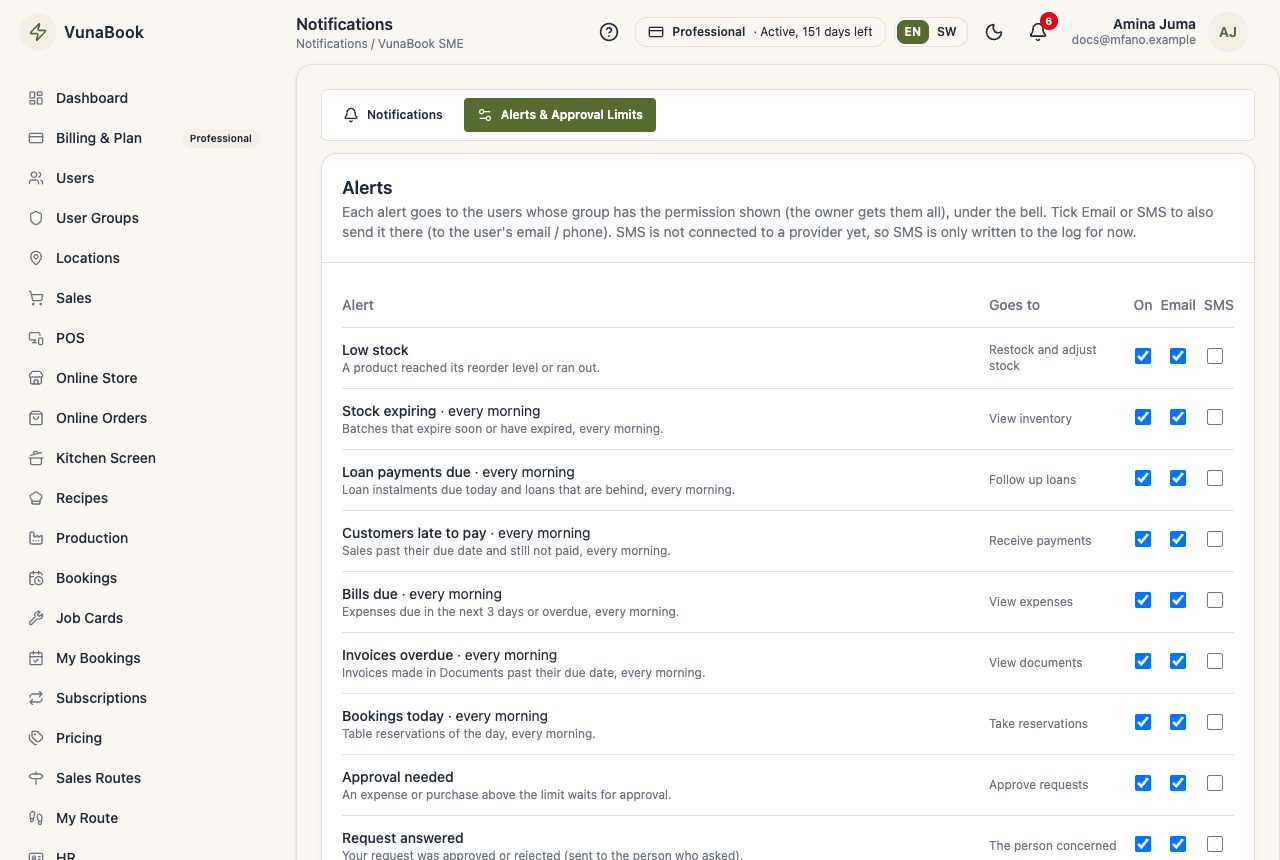
Alerts go by email to every company that has not chosen otherwise, but only to users who confirmed their email (see My Profile). Addresses with made-up or mistyped domains never get email. VunaBook does not send alerts by SMS.
Approval limits
Above a limit, a user who may not approve needs a manager:
- Expenses and purchases above the limit wait on the Approvals page and do not count until approved.
- Discounts and returns above the limit are approved on the spot with the manager's approval PIN, because the customer is waiting.
Approvals page
Waiting shows the requests to decide, History what was decided, and My Approval PIN sets your PIN.